
Hello everyone, I’m back! Today, we’re diving into IP Addressing and Subnetting - a fundamental yet fascinating topic for anyone working with networks or servers.
1. What is an IP Address?
An IP (Internet Protocol) Address is a unique identifier for devices on a network. Think of it like a home address, it’s how the internet knows where to deliver your “mail” (data packets) and distinguishes your “house” from your neighbor’s 😜. The most commonly used IP versions today are IPv4 and IPv6, other versions are virtually non-existent in modern networking. You can explore the history of IP versions here. In this post, I will focus specifically on IPv4.
An IPv4 address consists of 32 binary bits (4 bytes), divided into 4 octets (groups of 8 bits). Octets are separated by a ”.” (dot). Since each octet is 1 byte, its value ranges from 00000000 - 11111111 (binary) or 0 - 255 (decimal).
Example:
- Dotted Decimal:
192.168.1.1- Binary:
11000000.10101000.00000001.00000001
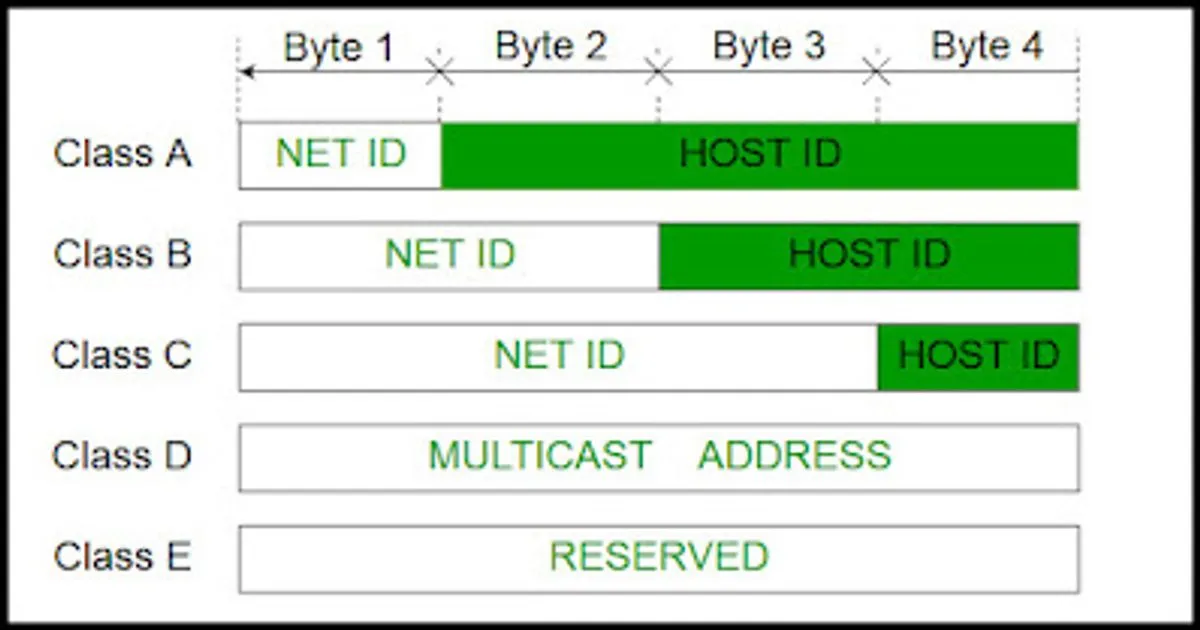
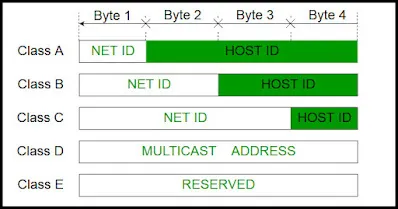
An IP address is split into two parts: the Network ID and the Host ID. The Network ID identifies the specific network, while the Host ID identifies the device within that network. Based on this, IP addresses are traditionally divided into 5 classes:
The first octet of each class has the following value ranges:
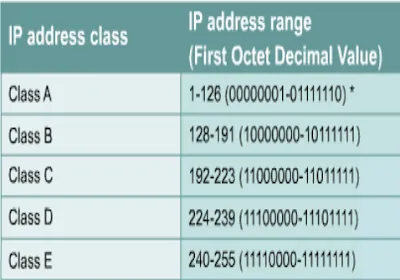
Looking at the chart above, you might wonder why Class A ranges from 1 - 126 instead of 0 - 127. The answer is that 0 and 127 are reserved for special purposes:
- 0.0.0.0: A meta-address representing the lack of a specific address.
- 127.x.x.x: The loopback address or localhost that you frequently use in development.
In practice, we mostly use Classes A, B, and C. Class D is reserved for Multicast, and Class E is reserved for research and experimental purposes.
2. What is Subnetting? Why do we need it?
With a 32-bit length, we have a total of possible IP addresses. That sounds like a lot, but it’s actually quite limited.
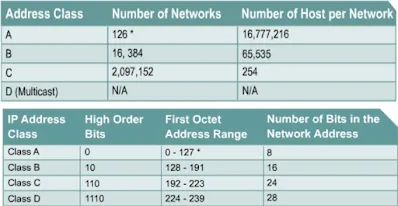
In a Class A network, we use 1 byte for the Network ID (keeping the first bit as 0 aka leading bits), giving us networks (except 0 and 127 that I mentioned above). However, each Class A network can hold hosts. Even the largest organization wouldn’t connect 16 million devices to a single flat network. Leaving these IPs unused is a massive waste of a limited resource.
Subnetting is the process of creating more logical networks within Classes A, B, or C. For example, instead of having one massive Class A network, you could break it into many smaller subnets.
However, subnetting reduces the total number of usable host IPs because every new subnet “costs” 2 addresses:
- Network Address: Where all Host ID bits are
0. - Broadcast Address: Where all Host ID bits are
1.
For example, in a Class C network 192.168.1.0, the broadcast address is 192.168.1.255. Thus, the usable host range is 192.168.1.1 to 192.168.1.254.
3. How to Subnet?
Before we dive into the “how”, let’s look at the Network Mask. A Network Mask helps you identify which bits belong to the Network ID and which belong to the Host ID. It does this by setting Network bits to 1 and Host bits to 0.
For example, 10.0.0.8 (Class A) has a default mask of 255.0.0.0 (because 8 bits are reserved for the Network ID).
By using the magic Bitwise AND operation between an IP and its mask, we can find the Network ID:
IP: 00001010.00000000.00000000.00001000 (10.0.0.8)Mask: 11111111.00000000.00000000.00000000 (255.0.0.0)-------------------------------------------Result: 00001010.00000000.00000000.00000000 (10.0.0.0)To create more subnets, we increase the number of Network ID bits by borrowing them from the Host ID part. If we borrow bits, we create subnets, and each will have usable hosts.
Example: Divide 192.168.1.0/24 into 4 subnets. We borrow 2 bits from the Host ID.
192.168.1.0 = 11000000.10101000.00000001.00000000
The 4 subnets (using a /26 mask) are:
192.168.1.0/26   =**11000000.10101000.00000001.00**000000
192.168.1.64/26  =**11000000.10101000.00000001.01**000000
192.168.1.128/26 =**11000000.10101000.00000001.10**000000
192.168.1.192/26 =**11000000.10101000.00000001.11**000000| No | Network | First IP | Last IP | Broadcast |
|---|---|---|---|---|
| 0 | 192.168.1.0/26 | 192.168.1.1 | 192.168.1.62 | 192.168.1.63 |
| 1 | 192.168.1.64/26 | 192.168.1.65 | 192.168.1.126 | 192.168.1.127 |
| 2 | 192.168.1.128/26 | 192.168.1.129 | 192.168.1.190 | 192.168.1.191 |
| 3 | 192.168.1.192/26 | 192.168.1.193 | 192.168.1.254 | 192.168.1.255 |
Pro Tip: To calculate quickly, the “step size” between subnets is . Just add that step size to the current network address to find the next one.
4. Are two devices on the same network?
Suppose we have two devices:
-
Device X:
172.16.20.30/20(Mask:255.255.240.0) -
Device Y:
172.16.28.64/20(Mask:255.255.240.0)
Using the AND operation:
IP: 10101100.00010000.00010100.00011110 (172.16.20.30)Mask: 11111111.11111111.11110000.00000000 (255.255.240.0)-------------------------------------------Result: 10101100.00010000.00010000.00000000 (172.16.16.0)Quick Check: For Device X, the first octet is 172 (Class B, default /16). We borrowed bits. The step size is . The subnets in the 3rd octet are 0, 16, 32… Since 20 and 28 both fall between 16 and 32, both devices are on the same subnet (172.16.16.0).
5. Applying Subnetting: VLSM
Imagine you have the network 200.15.5.0/24 and you need to divide it for the topology below:
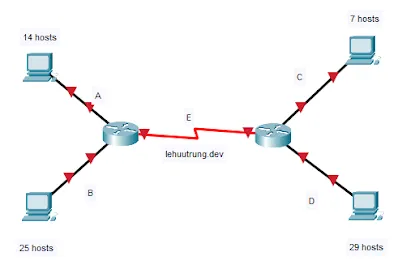
The network D has 29 hosts, which is largest. If we used a fixed mask, we would divide it into 8 equal subnets of 30 hosts each (borrowing 3 bits). Net A, B, C, D, E would all get a /27.
- Net A: 200.15.5.0/27
- Net B: 200.15.5.32/27
- Net C: 200.15.5.64/27
- Net D: 200.15.5.96/27
- Net E: 200.15.5.128/27
However, is this optimal? Different segments have different host requirements. This is where Variable Length Subnet Masks (VLSM) come in, allowing us to use different masks for different subnets.
VLSM Strategy: Always allocate for the largest host requirement first.
Order: D (29) > B (25) > A (14) > C (7) > E (2).
- Net D & Net B: Need ~30 hosts. Borrow 3 bits (). We will have subnets. Assign the first 2 subnets for D and B:
- Net 0: 200.15.5.0/27 (Net D)
- Net 1: 200.15.5.32/27 (Net B)
- Net 2: 200.15.5.64/27
- Net 3: 200.15.5.96/27
- Net 4: 200.15.5.128/27
- Net 5: 200.15.5.160/27
- Net 6: 200.15.5.192/27
- Net 7: 200.15.5.224/27
- Net A (14 hosts): We take the next available block (200.15.5.64/27) and borrow 1 more bit to create two /28 blocks ( hosts).
- Net 2a: 200.15.5.64/28 (Net A)
- Net 2b: 200.15.5.80/28
- Net C (7 hosts): Since it needs more than 6 hosts, it also requires a /28. We take the next available block.
- Net 2b: 200.15.5.80/28 (Net C)
- Net E (2 hosts): This is a router link. We take the next block (200.15.5.96/27) and borrow 3 more bits to create /30 subnets ( hosts).
- Net E: 200.15.5.96/30
Final Optimized Results:
- Net A: 200.15.5.64/28
- Net B: 200.15.5.32/27
- Net C: 200.15.5.80/28
- Net D: 200.15.5.0/27
- Net E: 200.15.5.96/30
References:
[1] IP Addressing and Subnetting for New Users: Cisco (27/11/2020)
That’s my introduction to subnetting! If you have any questions, feel free to comment below. If you found this useful, please share it with your friends! 😉