

Have you ever been excited to read a tech deep-dive only to be met with a “Site cannot be reached” page? Are you tired of toggling a VPN just to browse documentation? In this post, I’ll show you how to bypass blocks on sites like medium.com or towardsdatascience.com using DNS over HTTPS (DoH).
1. The problem
As a developer, reading articles on platforms like Medium or Towards Data Science is part of my daily routine. However, several ISPs in Vietnam currently block access to these domains.

If you look at the screenshot above, you’ll see the error DNS_PROBE_FINISHED_NXDOMAIN. This indicates that the issue lies with the DNS provided by your ISP. The solution? We simply need to use a different DNS provider instead of the ISP’s default one.
2. What is DNS?
You might be wondering: What exactly is DNS? DNS stands for Domain Name System. Think of it as the phonebook of the internet. While servers are identified by complex IPv4 or IPv6 addresses, humans prefer easy-to-remember domain names. DNS translates these names into IP addresses.
For example, my server’s IPv4 address is 127.0.0.1 and its domain is lehuutrung.dev. When you visit lehuutrung.dev, your browser sends a DNS query to a provider to resolve it to 127.0.0.1. Only after getting the IP can the browser send the actual request to my server.
Analogy: If you know someone’s house number, you go straight there! If not, you have to ask the “neighbors” (the DNS) where “lehuutrung.dev” lives, and they point you in the right direction.
3. DNS over HTTPS (DoH)
There is a catch: most standard ISP DNS queries do not support HTTPS. This means your requests are unencrypted, making it trivial for attackers (or your ISP) to monitor your browsing habits.
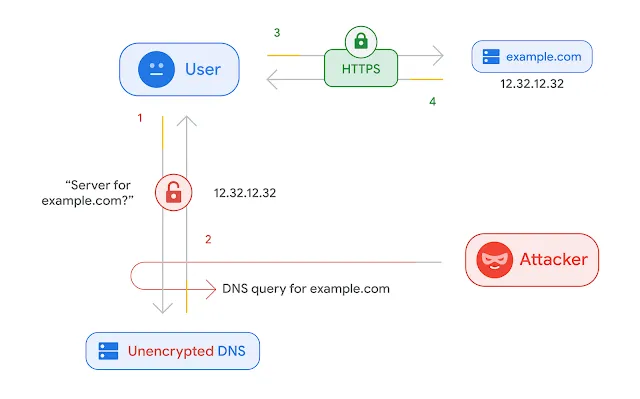
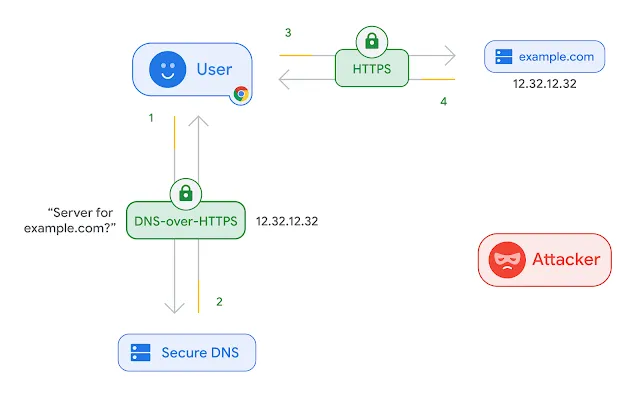
This is where DNS over HTTPS (DoH) comes in. It encrypts your DNS queries by sending them over an encrypted HTTPS connection. By using DoH, you switch to a more secure DNS server, such as Google Public DNS, Cloudflare (1.1.1.1), or OpenDNS.
Most modern browsers like Chrome, Firefox, and Edge support this feature (though Safari users are still waiting for native support). For this guide, I’ll show you how to configure it in Chrome.
4. Unblocking websites in your browser
Enabling DoH in Chrome is straightforward:
- Open Settings and search for “DNS” in the search bar. (Alternatively, paste
chrome://settings/security?search=dnsinto your address bar).
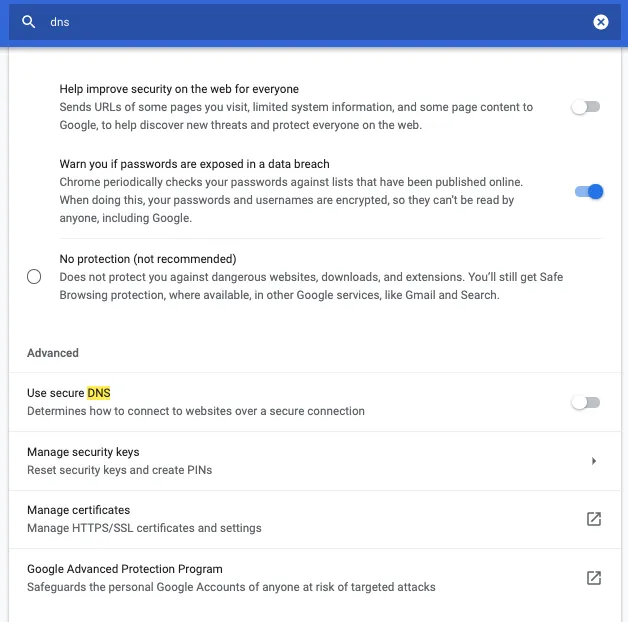
- Locate the “Use secure DNS” section. Enable it and select “With…” followed by your preferred provider. I personally recommend Cloudflare (1.1.1.1).
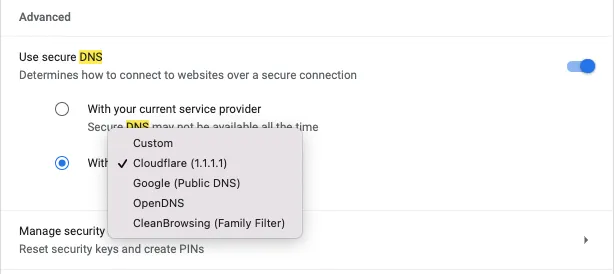
That’s it! You can now enjoy seamless access to sites like Medium while benefiting from a more secure, encrypted connection to your DNS server.
Thanks for reading! I hope this tip makes your browsing experience much smoother. Have a great day!
Note: The diagrams in Section 3 are sourced from whitehat.vn.