
Hello everyone! 👋
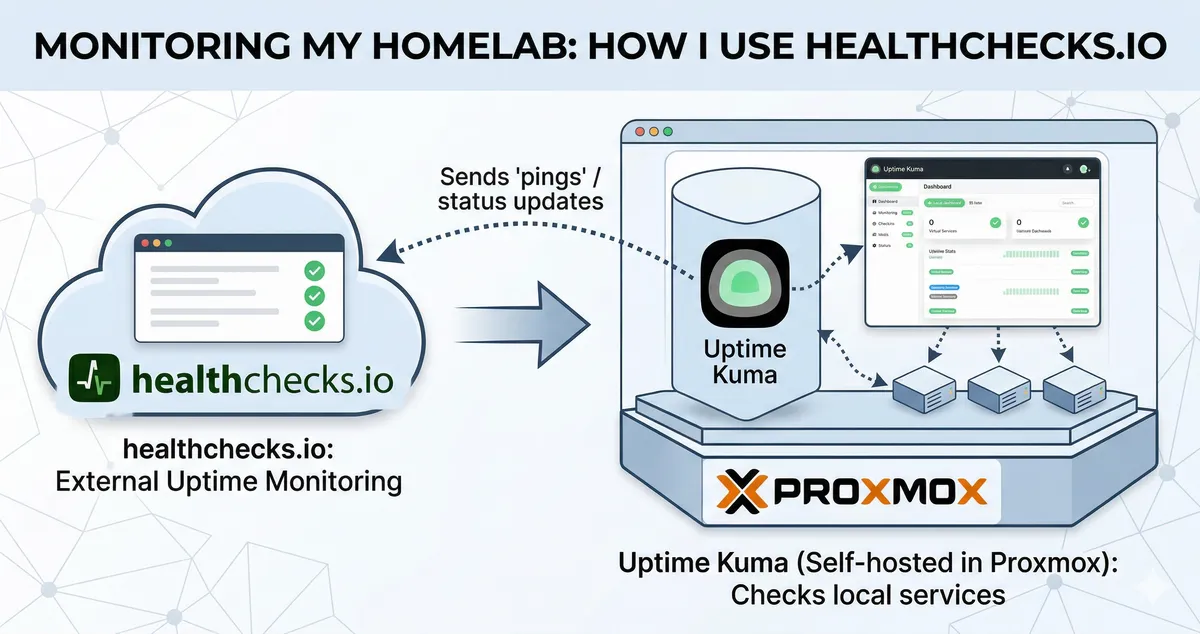
If you’re like me and enjoy self-hosting, you probably have a dashboard or a monitoring tool to keep an eye on your services. For my homelab running on Proxmox, my go-to choice is Uptime Kuma. It’s beautiful, easy to use, and I have it running in a lightweight LXC container.
It monitors my personal websites, my internal tools, and even my home network. But recently, I started thinking about a “what if” scenario that kept me up:
What if my Proxmox server itself goes down? 🙃
Since Uptime Kuma lives inside Proxmox, if the server loses power or the internet cuts out, Uptime Kuma goes down with it. It can’t send me an alert because it’s “dead” too. I realized I was in a bit of a loop. I needed a way to monitor my monitoring tool from the outside.
The search for a “Heartbeat”
I didn’t want anything complex. I didn’t want to open ports on my router or set up another server just to watch the first one. That’s when I found Healthchecks.io.
Instead of an external service trying to “ping” my home (which often fails because of firewalls), Healthchecks.io works the other way around. It waits for my server to say “I’m alive!” every few minutes. If my server stays silent for too long, Healthchecks.io knows something is wrong and sends me a message.
How I set it up on Proxmox
The best part is that I don’t need to install any heavy software. I just use a simple curl command that runs on my Proxmox host.
I initially started with a Cron job. Here is the command I use:
# This tells Healthchecks.io "Hey, I'm still here!"curl -fsS -m 10 --retry 5 https://hc-ping.com/your-unique-uuid-here > /dev/nullTo make it run automatically, I added it to my Proxmox crontab by typing crontab -e and adding this line:
*/5 * * * * curl -fsS -m 10 --retry 5 https://hc-ping.com/your-unique-uuid-here > /dev/nullMaking it manageable with Systemd
While Cron works, it’s a bit of a “set it and forget it” tool that can be hard to monitor if something goes wrong. Lately, I’ve been moving my scheduled tasks to Systemd Timers.
Why? Because it gives me much better control. I can check the logs with journalctl, see exactly when it last ran, and restart it like any other service.
Here is how I set it up:
1. The Service file (/etc/systemd/system/healthcheck.service)
This file defines what to run.
sudo nano /etc/systemd/system/healthcheck.service[Unit]Description=Send heartbeat to Healthchecks.ioAfter=network.target
[Service]Type=oneshotExecStart=/usr/bin/curl -fsS -m 10 --retry 5 https://hc-ping.com/your-unique-uuid-here2. The Timer file (/etc/systemd/system/healthcheck.timer)
This file defines when to run it.
sudo nano /etc/systemd/system/healthcheck.timer[Unit]Description=Run healthcheck every 5 minute
[Timer]OnBootSec=1minOnUnitActiveSec=5minUnit=healthcheck.service
[Install]WantedBy=timers.targetAfter creating these, I just had to enable and start the timer:
systemctl daemon-reloadsystemctl enable --now healthcheck.timerNow, if I want to see the status, I just run systemctl status healthcheck.timer. It feels much more robust and Proxmox native hehe.
Why this works so well
- It’s “Outside-In”: Because Healthchecks.io is a cloud service, it doesn’t care if my home power is out. It only cares that it didn’t hear from me.
- Firewall Friendly: My server is reaching out to the internet. I don’t have to change any settings on my home router.
- Zero Maintenance: Once I set that one line of code, I never have to touch it again. It just works.
Getting alerts on Telegram
Of course, I don’t want to check a website to see if my server is up. I want a notification on my phone.
Luckily, Healthchecks.io has a built-in Telegram bot called HealthchecksBot. I didn’t even have to create my own bot! I just followed their setup link, clicked “Start” on their official bot, and now I get instant messages like:
🔴 The check Homelab is DOWN (success signal did not arrive on time, grace time passed).
It’s such a relief knowing that if my entire house loses power while I’m out, I’ll know about it within minutes.
The ultimate question: Who monitors the monitor’s monitor?
Now, you might be thinking: Wait a second. What if Healthchecks.io goes down? Do I need another service to monitor them? 🙃
It’s a classic “rabbit hole” in systems engineering. In theory, you could build an infinite chain of monitors, but in practice, we stop at one or two levels for a simple reason: moving the failure point.
By using an external service like Healthchecks.io, I’ve moved the “point of failure” away from my home network and onto a professional, cloud-based infrastructure. The chances of my house losing power are much higher than the chances of a global service like Healthchecks.io crashing at the same time.
For those who want to be even more paranoid, there is the concept of Double Heartbeats. This is when you use two different, independent services (like Healthchecks.io and Cronitor) to watch the same system. If one monitoring service goes down, the other still has your back. It’s a bit overkill for my homelab, but it’s a fascinating look at how high-availability systems are designed.
It’s not about achieving 100% perfect monitoring (that doesn’t exist I think!), but about making sure that the “blind spots” are as small as possible. It’s just another part of the how and why that makes building a homelab so much fun.
Final thoughts
Sometimes the best solutions are the simplest ones. By adding just one line of code to my Proxmox server, I’ve closed the loop on my monitoring. I still use Uptime Kuma for the “fine details” of my apps, but Healthchecks.io is my “safety net” for the whole system.
It’s all part of the journey, building, breaking, and finding better ways to keep things running. 🐳
Are you monitoring your homelab from the outside? I’d love to hear how you do it! 😉
Thanks for reading! 😘
References: